
 EN
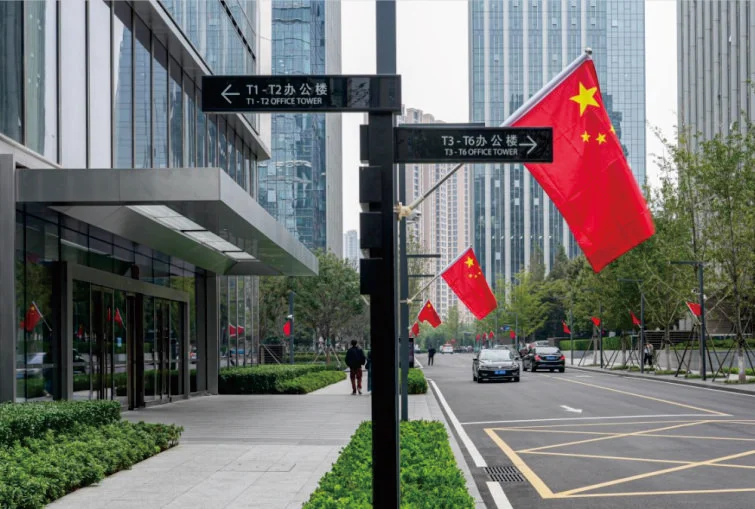
Why Production Renderings Are Essential for Custom Signage Accuracy
Production renderings serve as the vital final checkpoint before manufacturing custom signage begins. They convert design concepts into material-accurate, photorealistic previews that eliminate ambiguity—revealing exactly how light falls on surfaces, how typography reads at actual size, and how structural elements align from every angle. Without them, misinterpretations of scale, color, or finish often trigger costly rework; visual miscommunication is a leading contributor to production errors in custom signage.
By specifying details like metal thickness, LED placement, and substrate texture, renderings close the gap between approval and fabrication. In a field where custom signage frequently involves complex geometries and premium materials, such clarity is not optional—it’s essential. These digital prototypes let stakeholders identify issues early, conserve resources, and safeguard brand consistency. They also streamline collaboration, as all parties evaluate the same realistic model. Accounting for contextual factors like ambient light and viewing distance, renderings confirm legibility and impact before anything is built—minimizing field modifications and ensuring the sign performs reliably from day one.
The Step-by-Step Custom Signage Rendering Approval Process
Layered proofing: from vector files to photorealistic, material-accurate renderings
The approval journey for custom signage begins with simple vector outlines and progresses through distinct, purpose-built proofing layers. This staged approach prevents costly misinterpretation—particularly critical when physical assets must precisely match approved specifications. First, 2D vector files verify dimensions, layout, and typography. Next, photorealistic renderings introduce surface textures, accurately simulating brushed aluminum grain, translucent acrylic diffusion, and concrete wall mounting. Internal data from a top-tier manufacturer shows that material-accurate previews reduce post-production finish rejections by up to 37%. Lighting simulations follow, validating LED consistency and neon glow radius under realistic nighttime conditions. By advancing from flat geometry to dynamic, material-true visuals, teams catch scale conflicts, font legibility issues, and color mismatches long before fabrication begins.
Client sign-off protocols with version control and audit trails
Formal sign-off for custom signage must go beyond a simple email approval. A structured protocol—with version control, automated timestamps, and clear audit trails—keeps every stakeholder aligned and accountable. Designers upload iterations to a shared portal, where file hashes and change summaries (e.g., “v2 – adjusted letter-spacing per client comment on rendering dated 12 June”) prevent confusion across revision rounds. Clients review and click electronic approval, triggering a locked, timestamped record. This traceable workflow confirms the final rendering matches the approved brief—and ensures any post-sign-off alteration requires a documented change order. Such rigor satisfies compliance requirements for government or franchise projects, eliminates oral miscommunications, and guarantees the released fabrication file reflects the authorized design—protecting both budget and timeline.
Matching Digital Renderings to Real-World Custom Signage Performance
A digital preview can look flawless, yet the physical sign may appear dull or distorted if material properties, ambient conditions, and viewing context are overlooked. Bridging this gap requires systematic validation of the real-world variables that determine how custom signage actually performs on-site.
Validating substrate, lighting, viewing distance, and environmental factors
Substrate texture and finish directly affect light reflection and color saturation. For example, brushed metal may appear less vibrant than high-gloss acrylic under identical illumination—so substrate samples should be validated under typical installation lighting to ensure the rendering’s visual promise holds. Outdoor signage must contend with sunlight glare, shifting shadows, and nighttime illumination: test luminance levels at multiple times of day to avoid washed-out graphics or illegible text. Viewing distance impacts perceived sharpness—a rendering viewed on a desktop won’t reveal whether font size or pixel pitch meets legibility standards at 20 feet. Environmental stressors like moisture, dust, and temperature swings degrade materials over time, altering color fidelity and structural integrity. Include accelerated aging tests or site-specific pilot installations to confirm the rendering’s aesthetics endure. Aligning these variables with digital previews ensures the custom signage delivers intended impact, readability, and durability from day one.
When to Supplement Renderings with Physical Prototypes for Custom Signage
Even the most detail-rich digital rendering cannot fully replicate tactile feedback or real-world environmental behavior. Physical prototypes—often produced affordably via 3D printing—become indispensable when custom signage involves complex three-dimensional forms, intricate textures, or unconventional materials. If legibility hinges on light interplay—such as halo-lit channel letters or edge-lit translucent acrylic—a scaled physical model reveals precisely how illumination diffuses on-site, a nuance screens cannot guarantee. Prototypes also validate ergonomic factors like optimal viewing angles for pedestrians and drivers—perspective limitations in renderings can distort spatial perception. Physical samples allow stakeholders to assess material finish, weight, and mounting feasibility—critical for safety and long-term durability. A pre-production model catches flaws that would be exponentially costlier to fix during mass fabrication. According to a 2023 industry survey, manufacturers using physical prototypes report 40% fewer revision cycles in final manufacturing. When a project introduces novel fabrication methods—or when stakeholder confidence depends on holding the solution in hand—investing in a prototype is a strategic, accuracy-preserving step.
Frequently Asked Questions
Why are production renderings vital for custom signage?
Production renderings provide a photorealistic preview of how the final signage will look and perform, eliminating ambiguities regarding design, scale, color, texture, and light dynamics, which prevents costly errors.
How do renderings streamline the approval process for custom signage?
Renderings allow design teams and stakeholders to progress from vector-based prototypes to detailed material-accurate previews, catching issues like scale conflicts or color mismatches early in the process.
Why should physical prototypes supplement renderings?
Physical prototypes become indispensable when signage involves complex forms or materials. They validate tactile and environmental behavior, ensuring durability, legibility, and optimal design implementation.
How can digital renderings replicate real-world performance?
Digital renderings account for variables like substrate texture, lighting conditions, ambient environments, and viewing distances, which are validated through tests or pilot installations before fabrication.